
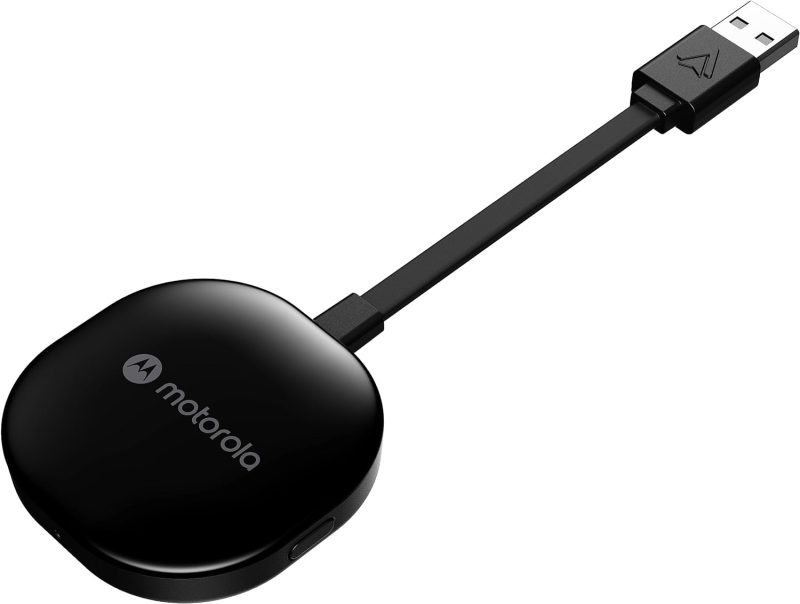
Product Features and Description
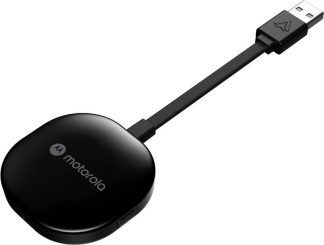
Welcome to the digital highway experience with the Motorola MA1 Wireless Android Auto Car Adapter—a nifty gadget promising to simplify the proliferating complexity of car-tech integration. This adapter serves the specific purpose of establishing an instant wireless connection between your smartphone and car screen, perfect for those everyday commutes or long-haul journeys.
Though predominantly used in daily transit, it shines equally during road trips when a secure, seamless sync of maps, music, and messages is invaluable. Surprisingly, its utility doesn’t cease there; imagine rare occasions like drive-in theaters tailored for the tech-savvy wanderer.
Stay tuned for what beckons as an engaging exploration into the Motorola MA1.
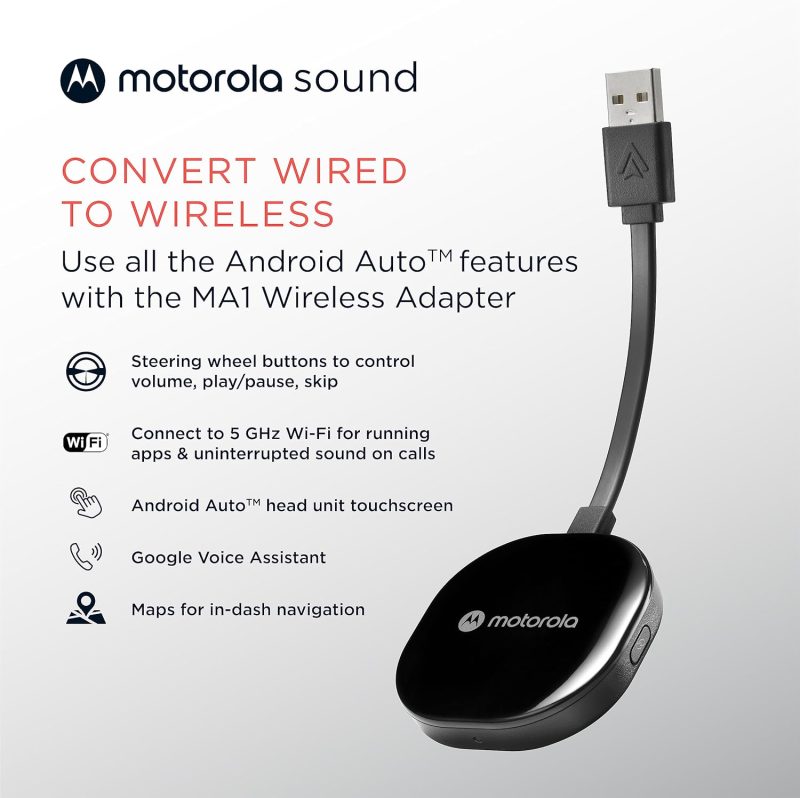
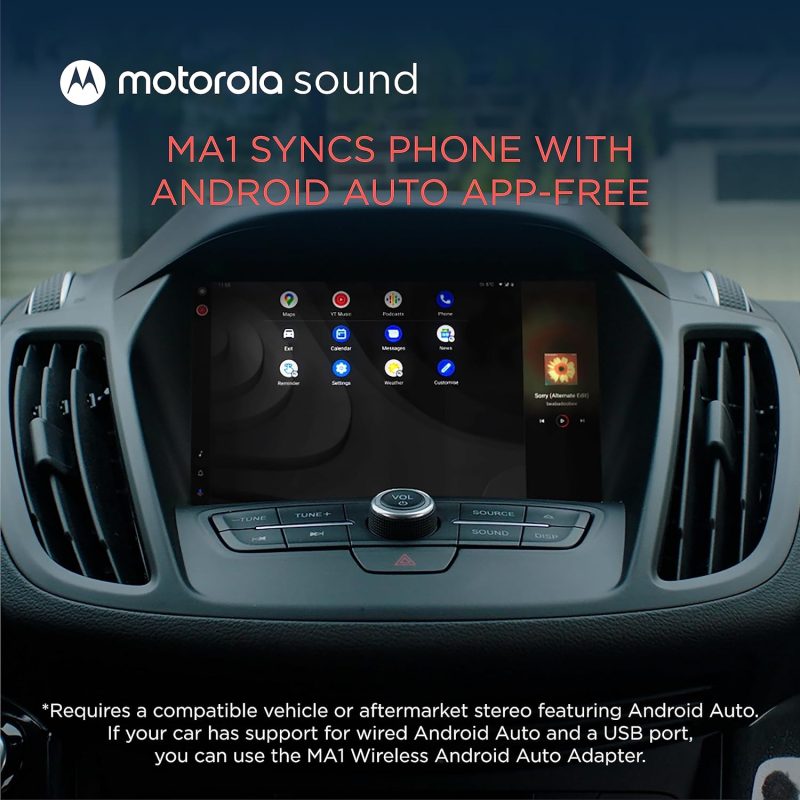
- Seamless Car Integration: The Motorola MA1 adapter offers an easy way to project your smartphone’s capabilities onto your car’s display. With a hassle-free setup, this device is compatible with any Android Auto-enabled vehicle and pairs wirelessly with a suitable Android smartphone, allowing you to utilize your phone’s features safely while driving.
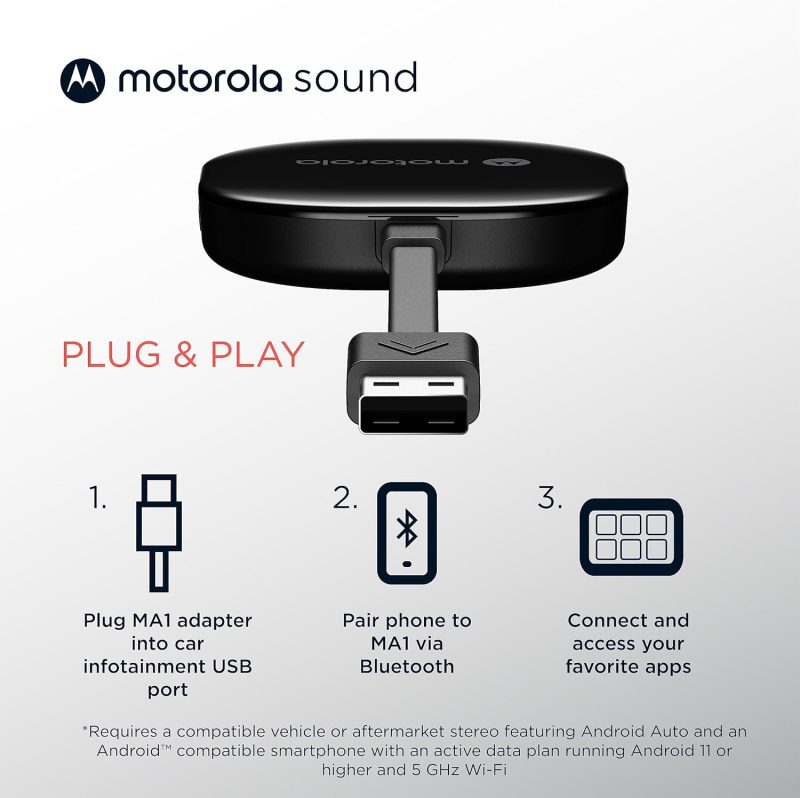
- Simple Setup Process: The user-friendly design of the Motorola MA1 ensures a quick and straightforward connection process. Simply plug the USB adapter into your car’s Android Auto port and pair it with your active Android phone to start experiencing wireless convenience on your car’s screen.
- High-Speed Wireless Connectivity: Equipped with a 5 GHz Wi-Fi connection, the Motorola MA1 adapter ensures that your favorite apps for navigation, media, and messaging are transmitted quickly and efficiently to your car’s display, perfect for seamless navigation during long road trips.
- Compact and Portable Design: The Motorola MA1 is designed with portability in mind, featuring a slim and lightweight build that’s easy to carry and doesn’t clutter your vehicle’s interior. It comes with a gel pad that secures the adapter in place, ensuring it stays fixed during your travels.
- About Motorola Sound: Motorola Sound is committed to enhancing your audio experience, whether you’re at home or on the go. Alongside products like the Motorola MA1, we offer a wide range of high-quality audio solutions, including in-ear headphones, true wireless earbuds, and over-ear headbands, all designed to deliver the exceptional sound that Motorola is known for.
For those who understand that life’s experiences are amplified by superior audio, Motorola Sound has curated a selection of products tailored to the nuances of individual listening preferences. With an expansive inventory that ranges from the convenience of wireless earbuds to the immersive experience provided by over-ear headphones, there is something to suit every audio connoisseur’s needs. Whether you’re looking for mono headsets for clear call quality or in-ear headphones for a secure fit during workouts, Motorola Sound ensures your auditory experience is unparalleled.
In the realm of car electronics, the Motorola MA1, a cutting-edge wireless Android Auto car adapter, stands out as a game-changer. It seamlessly bridges the gap between your smartphone and your vehicle’s infotainment system, allowing for effortless streaming of music, navigation, and hands-free communication. This adapter is a must-have for those who value connectivity and convenience while on the move. Furthermore, for individuals who are always on the go, Motorola Sound’s range of products is designed to integrate flawlessly with both Android and iOS devices, ensuring that your journey, whether by car or on foot, is accompanied by the highest fidelity sound.
Motorola MA1: Revolutionize Your Drive with Wireless Android Auto
| Feature | Description |
|---|---|
| Product Dimensions Average | The Motorola MA1 adapter is compact with dimensions of 3.06 x 1.22 x 0.12 inches, ensuring it does not take up much space and fits easily into your vehicle’s USB port. |
| Item Weight Good | At 1.09 ounces, the Motorola MA1 is lightweight, enhancing its portability and reducing any potential strain on the car’s USB port. |
| Best Sellers Rank Excellent | Ranked #1 in both Car In-Dash Navigation GPS Units and Vehicle GPS Units & Equipment, the Motorola MA1 demonstrates market leadership and high consumer trust. |
| Release Date Good | Available since January 4, 2022, the Motorola MA1 is relatively new to the market, suggesting that it incorporates the latest technology for wireless connectivity in vehicles. |
| Manufacturer Good | Motorola Sound is known for reliable electronics, indicating that the Motorola MA1 is likely to be a dependable choice for consumers seeking a wireless Android Auto car adapter. |









How Does the Wireless android auto car adapter Measure Up? Assessing Its Gains and Losses
Effortless and Reliable Connection: Many users, including Bill Ledbetter and TB, praise the Motorola MA1 Wireless Android Auto Car Adapter for its “Easy to install and use” capability, offering a seamless and wireless connection to the car’s display. Bill found the small size advantageous as it allowed him to “hide it in the storage compartment in the dash”, while TB was relieved to “no longer have to manually unlock my phone to use Android Auto”, finding it connected “flawlessly” every time after an initial setup.
High Compatibility and Convenience: Users like Khaled Elajam and Dave experienced consistent connectivity, with Khaled stating it “connects every single time with no drops or lag”, and Dave confirming that it “works perfectly” with multiple vehicles. This suggests the device’s compatibility with a range of car models and its reliability for maintaining a stable connection, significantly improving the driving experience by offering a cable-free solution.
Enhanced User Experience: Customers such as Danny and S. Roe found the device to significantly enhance their in-car tech interaction. Danny noted it was “well worth it for how well it works. Bulletproof!”, and S. Roe expressed delight at the convenience, stating, “It was so easy getting in the car later and voila…connected.” These experiences underline the adapter’s value in delivering a hassle-free user experience.
Connection and Durability Issues: Some users report connection stability problems and a limited lifespan. Jorge Andres Arenas describes his adapter as having turned into “just a brick” after 8 months of use, while Booger Goo experienced it “stops working after a year”. These reviews raise concerns about the device’s reliability over time and its susceptibility to connectivity issues.
Inconvenience and Compatibility Challenges: Despite the positive aspects, there are reports of the adapter not functioning as expected for all users. JR finds it “useless for drives under 15 min” due to the slow startup time, while K9dopecop points out a significant limitation, stating the device “requires VPN to be disabled”, which might be a deal-breaker for privacy-conscious users or those who rely on VPNs for work.
The stars speak of…
Opinions about this product were divided in such a proportion among the buyers.
After issues with the initial setup I was going to return it. Gave it another try glad I did. Work really well the setup take a little bite of time to get going but once it does your good. I do have an occasional and sort time issue when it losses Bluetooth connection with phone will reconnect quickly and your back a running. I would recommend that if you are going to get watch a few videos online to help with setup and be patient.
Works great when it finally connects, unfortunately i live in a small town and am at my destination 95% of the time before it finally connects…….useless for drives under 15 min.
Discover similar, top-rated products available just for you at great prices!





Understanding More: Questions Answered and Explained
What is the Motorola MA1, and how does it work?The Motorola MA1 is a wireless car adapter that allows you to connect your smartphone to your car’s display without the need for cables. It’s a direct plug-in USB adapter that uses Wi-Fi to communicate with your phone, enabling you to access Android Auto wirelessly. Once plugged into your car’s USB port, the adapter pairs with your phone, and Android Auto starts automatically when you start your car, giving you access to navigation, music, and more.
Is the adapter compatible with all cars and smartphones?The adapter is designed to work with any car that has Android Auto support and a USB port. However, it is important to note that the car must have Android Auto capabilities. As for smartphones, it works with most Android phones that support Android Auto. It is recommended to check the compatibility with your specific car model and smartphone before purchasing.
How do I set up the adapter in my car?Setting up the adapter is straightforward. You plug it into your car’s USB port designated for Android Auto, pair it with your smartphone via Wi-Fi, and follow any on-screen instructions. The device typically pairs automatically once the initial setup is done, so you don’t need to reconnect manually every time.
Does the Motorola MA1 adapter require a power source?The adapter is powered through the USB port in your car. There’s no need for an external power source or battery. As long as your car is running or the accessory mode is on, the adapter will be powered and functional.
Can I still use my car’s USB port for charging while using the adapter?While the adapter occupies the USB port it’s plugged into, it typically does not prevent you from charging your phone. Many cars have multiple USB ports, so you can use another port for charging. If there is only one port, some users opt for a USB splitter or hub to retain charging capabilities alongside the adapter’s functionality.
What happens if I receive a call while using the adapter?When you receive a call, Android Auto will handle it just like it would with a wired connection. The call interface will appear on your car’s screen, and you can answer using the car’s controls. Your music or navigation will pause or lower in volume, and resume once the call is finished.
Is there any latency or delay when using the adapter for navigation or music?The adapter is designed to offer a seamless and responsive experience. There should be minimal latency or delay when using apps for navigation or music streaming. However, the performance can be influenced by factors like the smartphone’s processing power, the car’s head unit capabilities, and the quality of the Wi-Fi connection between the adapter and the phone.
Discover similar, top-rated products available just for you at great prices!




James Callahan –
Works with a golf
Was waiting for a long time for the price to drop and on Black Friday it finally did. I tried the cheaper brands with my VW golf and it would just shut down my console. Followed the directions for this and connected every time since then with no problems. Hope it continues to work this well.
Erik –
Will Not Connect
I spent 2 hours just trying to get the MA1 to connect to my car’s infotainment unit via Bluetooth without success. I repeated the steps and even restarted my radio and cellphone numerous times. At one point, it did show the wifi, but it was requesting a password. What password?! If I cannot even get it to connect (step 2 of 3), then it’s not worth the hassle. Will be returning the item.
Juanvjay –
Very nice device but stopped working after 8 months
I like it very much, i bought a couple of them but the 1st one i bought already stopped working. Doest not pair anymore with my phone. Initially i thought it was my car’s info system was the problem, but when we put the other one i bought for my wife’s car it worked perfectly.
Javier Rodriguez –
Un buen juguete pero…
Se desconecta del móvil y aveces ni si quiera se conecta, toca apagarlo y encenderlo de nuevo…
L Moeltner –
Quick simple setup
Literally plug and play. Had tried another brand previously and it didn’t work. This works very well.
Brad C. –
Good value!
Bought this before a 12 hour drive in my wife’s 2018 Honda Odyssey. Overall, it worked pretty good. I think the positives of this device are pretty self-explanatory, so I’ll list a few negatives. Negatives: 1. Disconnected twice during the trip which required unplugging from the USB to get reconnected. 2. Steering wheel inputs are quick after connecting, but they slow down after a bit. Skipping songs on Spotify from the steering wheel ended up with close to a 5 sec lag. 3. Using Waze, the turn-by-turn directions on the gauge cluster were glitched. 4. No wireless Car Play option for my wife’s iPhone made it inconvenient when switching drivers since she had to plug into the same USB the MA1 connects to.
ChimeraTwin –
Worked great for a year
This thing worked great for a year, but then I started having connection issues and now my phone will not connect to it at all. Tried to unpair and pair again, and also tried a factory reset and that did not work either.
Joey F. –
Died after use
After 6 months of normal use the device has died and will not work at all. Very disappointing
Nabil Elkhatib –
Not working
This product its seems fine in the beginning and after a couple of months of use stared to disconnect every 20 or 30 minutes then stops working after 9 months..my advice don’t buy it..because even they don’t respond for the warranty.
Amazon Customer –
Good…for a while…then dead
I purchased a total of 3 of these to use in all my vehicles. 2 of the 3 have had the bluetooth quit making it useless. The first one that died I was able to return for a replacement which is still operating. The 2nd one just died (after 8 months) with the same bluetooth problem. I will also attempt to return it for a replacement. I last one is in my least used vehicle and is still operating for now. I do not recommend this adapter. While it works good, it doesn’t last long enough to justify the cost.
WILLIAM L BROCK –
Garbage
These only last a few months before they fail… Expensive piece of garbage! Do not buy…
Michael Fulk –
Great value
Easy to install
Buyer of all things –
Loses wifi and drops out
When it works, it works as expected. EVERY SINGLE TIME I drive by a truck weigh station, it drops out to the car’s factory system. It USUALLY comes back after I’ve driven a half mile or so past the last overhead antenna for the weigh station. Sometimes it just won’t come back and I have to do a full reset and setup to get it to work again. I’m seeing the same thing happen by a few specific businesses. I bought 2 of these at the same time. Two different phones, two different cars, same exact problems in same exact places. Annoying enough to throw in a drawer and forget.
DannyVWhite –
Work good on my 2018 Honda Goldwing
The moment my bike starts up it’s actually connect
Pedro Pérez –
Perfecto para Android auto.
Muy fácil y sencillo de usar.
Alex Fu –
Not worthy
Overpriced,just a brand thats it,unstable connection,always disconnecting,next time im going with the cheaper brands
Kim V. –
It works well 2 months now.
I have no problem after using it for 2 months with 2021 Lexus 350.
Michael Murphy –
Easy and fast connection time
This Motorola MA1 Wireless Android Auto Car Adapter is an absolute must!! It connects quickly each time when entering my 2023 Ford Mustang Mach 1 (Ford – Sync 3) and cycling the ignition button. Definitely give this device two 👍👍 😁
Rob –
Good product at a fair price
After owning several cars with built in navigation systems, I purchased a 2022 PHEV during the pandemic that doesn’t have built in navigation. It also did not support Alexa Auto wireless connectivity. This adapter allows me to use smart phone navigation systems (and other apps) as if they were built in. This was well worth the money. Setup was simple and it supports all the functionality I need.
S.Tobon –
Great
Easy to set up, works perfectly
Kesavan –
Does not work with GMC Sierra 2020
Does not work with my GMC Sierra 2020. There are a couple other in depth reviews stating the same thing I went through. It will make a connection, however, the head unit will not load android auto.
Jane Doe –
2023 MG ZS
Works like a charm. Finally I have an unplugged Android Auto connection. Hooray! It establishes the wireless connection super fast. Once I unlock the door and buckle up on the drivers side, start up the engine, AA already shows up on the cars display. No interruptions, runs smooth every day. Now I am driving like a Boss.
bann-err –
Worked great for 8 months, awaiting Motorola support
Equipment used is: Motorola Edge (2021) and a 2017 Honda Accord EX. The device worked flawlessly for 8 months. The only small gripe I had was it was slower to connect that the USB cable method – usually 15-20 seconds before “Unknown Devices” message shows up and connection proceeds. No issues with any lag or slowness of Google maps or Waze, nor with steering wheel mounted audio controls. Phone didn’t need to be unlocked to connect wirelessly ( unlike the wired setup ). Happy camper… until: After 8 months of daily use, one day when driving the connection dropped and did not reconnect. I followed all troubleshooting steps and nothing could get it connect again. Factory reset would not work, stuck on red LED forever after holding down the reset. Wired Android Auto still works, so I suspect the unit is bricked. So, an email has been sent to Motorola support. We’ll see if they can help me.
rvg99 –
Stopped working one day. Lives in the glove box
I loved this product when I first received it! The Android Auto interface was lag free, and the audio quality didn’t seemed compromised, but one day, I get into my car, and it won’t connect. I followed the steps in the manual to try and reestablish a connection with my phone, but nothing works. Expensive paperweight.
Praneeth –
Bad please don’t waste your money
It doesn’t connect at all. Complete waste of money. Should have return it but I crossed the return window. Absolutely waste of money and time. Huge Regret !
C. Dangerfield –
Works wonders!!
I have had this for a month and it seems to just work. After first connection it just does what it claims and does it well. I haven’t had any connection issues at all, but YMMV. Winter is coming, so we will see how it works in the cold.
Hil Palmer –
Work good in my ’18 Silverado 3500
95% of the time this works flawlessly in my ’18 Silverado and my Samsung S20+. Every once in a while it does not want to connect. I was thinking it was something with my phone or this device. During my last trouble-shooting session it was my truck. Turns out the USB port was not working that I had this plugged in. Swapped my USB thumb drive and this around, and now my USB thumb drive didn’t work. I am not sure if it was something with remote starting or what. But after turning off the truck, opening the door for a few minutes, and then returning the port functioned as expected again. Other than the occasional hick up with the connect it works great. There is a delay in audio which can be a little irrigating, but WAY better than some of these Android boxes I have tried. Using this instead of an Android box will also resume the maps and music that you were playing when you return to the truck.
LMGREVIEW –
Stopped working
Worked well for a few months, and then stopped working.
John –
Only works for ~20 months
Purchase in February 2022, began to be finnicky in October 2023 and outright stopped connecting in November 2023
Abedip –
Frequent disconnects on Mazda Cx 5 2020.
Dont buy for mazda it disconnects frequently. Tried everything.
J L –
Works perfect. Does exaclty what it says it will do and then some.
Works that well that I bought one for each of my cars. I highly recomend this product. You dont even need the instructions to make this work its that easy.
Myron Woodley –
Doesn’t last!
Worked well at first. Had some bugs after a few months. Didn’t last a year. An expensive gadget that stayed in one place. Wouldn’t recommend.
Raymond –
Brought my 2020 into 2023
Massive upgrade to allow wireless connection to android auto. I can now use the ports in my car for other things. Only small problem is the delay when getting into car to connecting to android auto but it’s reasonable timing. Phone first connects via bluetooth to car then android auto wifi kicks in. Total time is about 7-12 seconds, during this time you cannot hear anything from your phone. Again, it sounds bad but you get used to it for the functionality. It’s a 1 time thing each time you drive is all.
Maria Garcia-Montes –
Android Auto Issues Resolved!
I had many disconnect issues when I had my Android phone connected with a USB cable to the car radio. I was constantly unplugging and plugging the cable back in. It was very frustrating. When I got this device, all the problems went away! It took just a minute to set up and now Android Auto works very reliably!
Hien D. –
Once set up it’s good
Takes a while to set up like the other reviews say. You have to be already connected to the car’s Bluetooth with your phone and then connect to the doggle but once you have it set up it auto connects like it should. But every now and then it would disconnect for like 5-30 seconds and then reconnect which is a little annoying especially right before a turn or exit. But overall it is way better than connecting with a wired connection to your car via phone.
Comet003 –
Great while working
This syncs so seamless with andorid auto and works so well. Connects quickly and no latency once connected. Works great for two phones as well. Great having a chord free cabin. After half a year it just stops working. This is my second one.
Kenneth Shim –
Stops working after a few months
It worked well (with certain delays) for the first few months and now it just doesn’t work at all. Constantly disconnects from the android auto system
Indiana 350Z –
Piece of Cake!
Works perfectly. Good price.
Gadberry –
Doesn’t appear to work with Motorola Moto G G5 2023 model phone.
After resetting and reinstalling everything a couple of times I tried it with my spouses phone which is the exact same model and build as mine. 2023 Moto G G5. Got the exact same results with it randomly disconnecing and reconnecting kind of like a reboot. I spent over 25 years in information systems troubleshooting, so I have no doubt the phone model is the issue. Even verified developer settings on phones. Hooked up my sons Carsifi adapter with it’s app and it worked with no issues, so that pretty much rules out everything else. I was really wanting this to work as it doesn’t require an app.
Jeffrey DeMello –
Easy setup
A+
Jessica Purdy –
Good enough, but better would be a simple fix
It works well enough but there are two small issues. First, the USB cord is not long enough for the device to lay on any surface in my car. Which brings us to the second issue. The adhesive pad is not strong enough to keep the device mounted under or beside the USB port. It drops the minute you close the door or hit a bump. because the device is constantly dangling it can slowly work its way loose in the USB port causing connectivity issues.
Emmit Brown –
Works great!
I bought this along with a 6Ft USB extension cable. The only USB receptacles I have are located right under the climate controls/radio and I couldn’t really think of an aesthetically pleasing way to have this plugged in there, so I ran the extension cable from the USB receptacle to the center console, where I have this plugged in. After starting my car about 15-ish seconds give or take, it connects and starts playing music automatically. Exactly what I was looking for!
L. Reyes –
Perfect for wireless connection
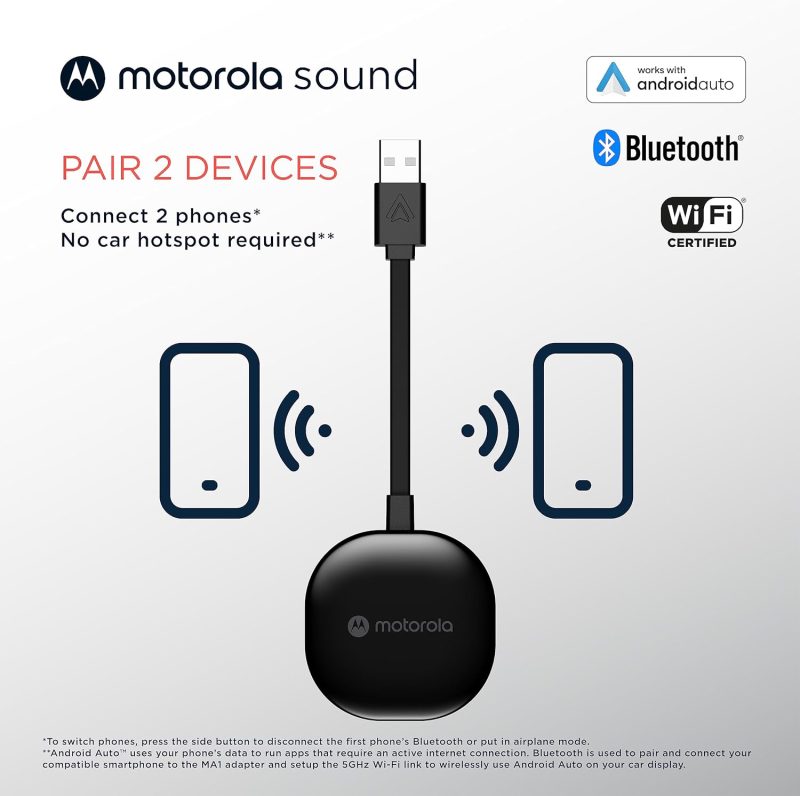
Does what it is intended for and has not given me any issues, the switching between multiple devices works like a charm too!
MB –
Stopped working after 3 months
When it works it’s great……just have to get it to work. Setup was easy when I first got it. But from the jump it would disconnect sporadically. I learned to live it. But after two months it started to disconnect more frequently, 15 mile car ride would disconnect 2 – 3 times, but it would eventually work and connect. But now it won’t connect at all. I’ve done a factory reset and followed all the instructions online now it won’t go into pairing mode. I wish I could return this but I’m out of the refund time. FWIW, I’m using a galaxy s21 and a 2023 lexus.
Amazon Customer –
Works well
Initial setup was a little wonky, but I’ve been using it in my 2020 Road Glide for a couple months now and it just works. No more cord hanging out of my fairing.
Cesar Salazar –
It stopped working / keeps disconnecting 6 months old
It keeps disconnecting, it doesn’t stay connected. I cant even return anymore ( i bought it 6 months ago or so ) what a waste of money because is not cheap at all, and i went for ” good brand ” . JUNK
Evan Fixler –
No more cables!
This works amazingly well The jack was failing and now I don’t have to hook up cables to the phone.
Miranda Joynt –
Easy to setup and connects quickly
This is a great way to get my phone to connect wirelessly to my car. I always hated having to have a cord to use Android Auto, and now it just does it automatically when I get in.
Ikaikanui –
It’s okay.
It can be a problem when first start using it – in a vehicle, when you switch out to another vehicle, you have to setup again. Wish it was plug and play but, after setting it up in at least 3 vehicles, it’s convenient. It loses transmission at times -I drive downtown Seattle and can think of at least 2 places where it always drop, one near the U district. Very annoying when following google maps. Other then those three places it drops every now and then.
Hugh –
Easy to use, connects every time.
This one was for my motorcycle, may get a second for the car.